The desk, terrace and guest room may all need a dependable connection, but they are not necessarily easy places for the same router to reach. Put those uses on the house plan before deciding where the internet equipment will live.
This guide helps an owner prepare a network brief and review the result. It does not specify cable routes, electrical work, outdoor equipment or a guaranteed coverage area. Those choices need the actual building, local requirements and the intended equipment in front of the responsible installer.
Separate the internet service from the network inside the house
Think about three questions: what service reaches the property, how the home network distributes it, and how the particular device connects in the room where it is used. A problem at one stage can look like a problem elsewhere.
Ofcom explains that a slow Wi-Fi test does not necessarily identify a fault with the broadband line. The router, device, distance, walls and interference can all affect the result. It also notes that delay matters for live activities such as video calls, not just download speed. [1]
For a new property, ask the provider to confirm service at the exact site, its installation requirements and the scope of the proposed service. Keep that response separate from the network installer's room-coverage proposal. A neighbor's connection or a marketing coverage map is a reason to investigate, not proof of what is available at your house.
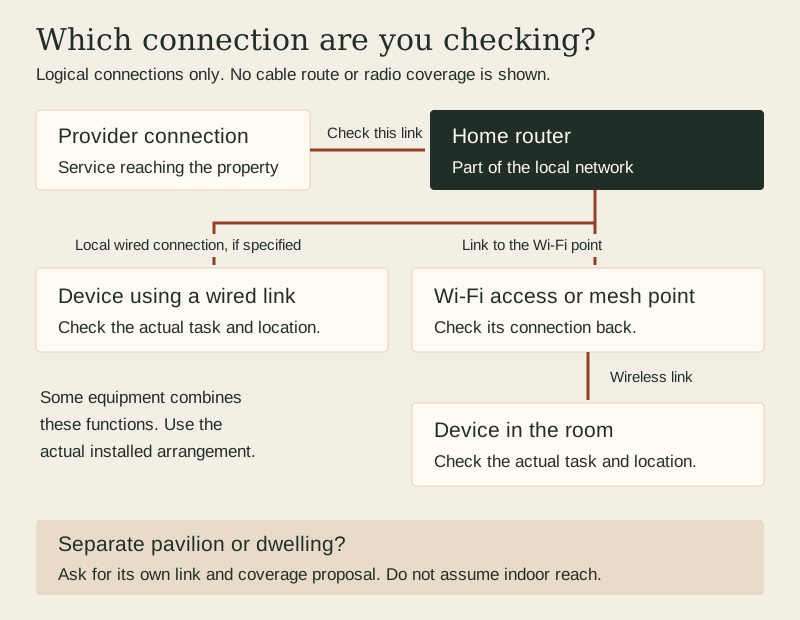
Original logical diagram. Lines represent connections, not cable routes, radio range or a recommended equipment layout. Based on the distinctions in sources 1 and 3.
This is a logical diagram, not a wiring plan or a prediction of radio coverage. A real network may combine functions in one device or use several pieces of equipment. The point is to identify which part is being discussed or tested.
Begin with places and tasks rather than a device count
Mark the actual work desk, television, usual video-call location, outdoor sitting area and any separate studio or guest building. Add the fixed equipment that needs a connection. Distinguish a convenient browsing spot from a location where an interrupted call would disrupt the household.
For each place, write the task and the devices likely to be used at the same time. Include upload-heavy work if it matters. Keep the brief descriptive until the provider and installer translate it into an appropriate service and network proposal.
Do not fill the plan with access points simply to make it look complete. Google notes that concrete or brick walls and other obstructions can affect its Wi-Fi systems, and that coverage depends on the construction and surrounding network conditions. [4] A floor-area number on a product box cannot account for your specific wall layout.
Make equipment locations part of the design discussion
An out-of-sight cabinet is not automatically a good home for equipment that needs to communicate wirelessly. Google's placement guidance recommends open, elevated locations for its devices and a layout based on where Wi-Fi will be used. [2] Follow the exact manufacturer's instructions rather than copying one brand's suggested spacing to another system.
Ask the installer and designer to agree on equipment locations, suitable power, service access and any planned cable pathways before finishes are closed. They should coordinate penetrations, required separations, weather protection and fire or structural implications where relevant. This is a request for a coordinated design, not permission to drill through a wall or run a cable beside electrical wiring.
Retain the agreed location plan with the construction documents. If a cabinet, wall material or equipment position changes later, flag it for review rather than assuming the original network proposal still applies.
A mesh point still needs a useful connection back
Wireless mesh can help distribute a network, but adding a point in a dead zone is not the same as providing it with a good connection. Google's mesh-test guidance distinguishes the link between the primary router and additional points; a weak link there can become a bottleneck for devices using that point. [3]
Ask how each proposed access point or mesh point connects to the rest of the network. If the proposal includes a wired connection, have the installer specify and coordinate it. If it relies on wireless links, ask how those links will be checked in the finished building. Avoid treating the number of boxes as the performance result.
The household does not need to master every networking term. It does need to know whether a weak room connection is being addressed by placement, a different connection path, a service change or an unsupported promise.
Treat a separate building as its own question
A pavilion, workshop or second dwelling introduces more than another room label. Give the installer its location, intended use, construction and access constraints, and ask for a specific proposal for reaching it.
Check the chosen equipment's intended use. For example, Google says its Nest Wi-Fi systems are not intended for sharing a network across multiple dwellings. [4] That is a product limitation, not a rule that every other system has the same capability or restriction.
Any outdoor or inter-building link needs an appropriate assessment of the route, exposure, equipment, electrical protection and local requirements. Do not assume that extending an indoor cable across the garden or placing an indoor device under an eave is an acceptable solution. A proposed link should also identify who will maintain it and how a fault will be investigated safely.
Use a brief that can later become a test record
Bring this worksheet to the provider and installer. It is an original planning aid, not a set of performance guarantees.
A home-network brief and completion worksheet
Part of the brief
What to identify now
What to verify at completion
Incoming service
Exact property, provider scope and service terms
Connection installed and checked by the relevant provider
Work and living areas
Real device locations and simultaneous activities
The intended tasks work at those places under recorded conditions
Network equipment
Agreed locations, access and connection method
Installed arrangement matches the reviewed plan
Separate building
Use, exposure and a specific link proposal
Link and local coverage tested, with maintenance responsibility clear
Connected household equipment
Exact devices and compatibility requirements
Each required function works, including any agreed alert test
Ownership and support
Account owner, update responsibility and support contact
Owner receives usable documentation and secure access
On a small screen, swipe the table horizontally to see every column.
Test the finished arrangement, not only the empty room
Agree the acceptance checks before installation. Include the provider-side checks, links within the home network and the user's actual tasks. These are related tests, but they do not answer the same question.
Use the real rooms with their usual doors, furniture and device positions. Record the device, location, date, connection type and what else was using the network. Ofcom recommends testing at different times because results vary. [1] A single screenshot is less informative than repeatable observations and a clear account of the conditions.
For a troublesome area, record the symptom rather than diagnosing it from signal bars alone: a call drops, a file upload stalls, or a particular device loses connection. Ask the provider or installer to identify the next check. Keep unresolved locations on the completion list instead of calling the whole house finished after one successful test beside the router.
Include security and support in the handover
The FTC recommends current router software, secure network encryption and distinct protections for network access and router administration. It also describes a separate guest network as a way to avoid handing every visitor the main network password. [5] Ask the installer to explain the selected equipment's supported settings and guest-access behavior.
Keep control of the owner account and agree who is responsible for updates and future support. Store credentials privately, not in a public plan, a site photograph or an openly shared maintenance sheet. A guest network is not a reason to assume every connected device has been isolated in the way you intended; have the actual configuration explained and checked.
Add the equipment list, approved location plan, test record and support details to the house handover file. If the network supports remote observations while the house is empty, include its dependencies in the absence plan.
Sources checked November 7, 2026. Manufacturer examples illustrate questions to verify, not a product recommendation or a claim of local availability. Ofcom's technical guidance is used here, not its UK-specific consumer-rights rules. The diagram and worksheet are original editorial planning tools.